A robbery can leave a thick roll in your pocket, and one bust can take all of it. In GTA 6, the number on the HUD is Pocket Cash. That figure is not your bank balance, and it is not Family Savings.
If you buy GTA 6 Accounts that already sit mid-campaign, open the BuckMe app before you spend or stash anything. Jason and Lucia each carry their own pocket cash and their own checking balance. The shared Family Savings pool is a third pot: money that goes in does not come back out.
Buck Me starts at the Fleeca branch in Key Lento
The bank does not appear on its own. About half a day after Coming Home, Lucia calls Jason. She needs an account so her community service pay has somewhere to land, and neither of them has one yet.
Meet her at the Fleeca branch in Key Lento, in Mariana County. Talk to the teller, who sends you to the manager at the table in the right-hand corner. Follow him into his office, where Lucia joins the meeting. A credit check comes back too weak for a normal account, so the manager points you to a phone app called BuckMe.
While you are still in the office, the manager asks whether Jason has any money saved. You can say you have nothing, or that there is saved cash at the house. Telling Lucia about the saved cash helps the relationship.
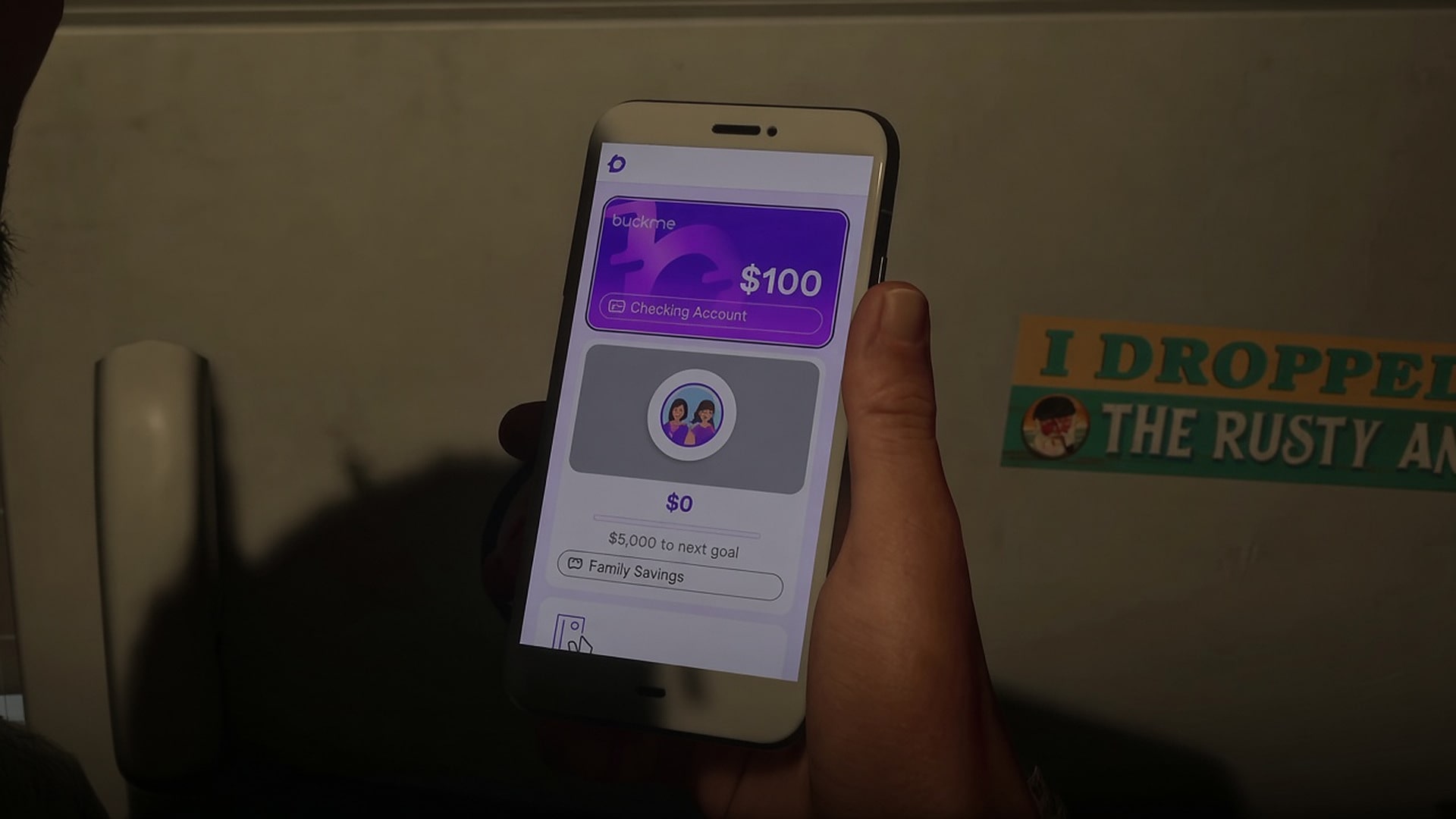
A cutscene drops you back at Jason’s house with a $100 welcome gift already in the checking account. Pull the phone with Up on the D-pad and open the purple B icon. That is BuckMe. The mission is not finished at the download. Open Checking Account at the top of the app, tap Buck Yourself, and move that $100 into Family Savings. After the tutorial, the two of you watch some TV and the mission wraps at the house.
The first transfer never touches your pocket
Buck Me’s opening move is a checking-to-savings transfer. It does not send you to an ATM, and it does not clear the cash you are holding. Family Savings only accepts money from a BuckMe Checking Account. Bills still on you stay in your pocket until you deposit them later.
Confirm the transfer and that $100 leaves checking for good.
Deposit Cash Into BuckMe is a separate job
After the app is on the phone, Chapter 1 gives you a second banking task: Deposit Cash Into BuckMe. The brief is short. Deposit some of your pocket cash into your BuckMe Checking Account at any ATM. You play it as Jason.
The task has no map marker. Open the map, select the storybook icon, and find it in the mission list. Then open BuckMe and choose ATM Finder – Set Destination. The app sets a waypoint to the nearest machine. There is one next to Jason’s house if you are still in Key Lento.
Walk up to the ATM and press Triangle or Y. You can deposit, withdraw, and look through recent transactions. A single deposit or withdrawal tops out at $20,000, which is also the most Pocket Cash either character can hold. You cannot push a deposit past the current checking balance limit.
Pocket cash and the checking balance do different work
The cash in your pocket is physical money. Most shops take it for smaller purchases up to $1,000. Bigger buys, and any service that only takes digital payment, come out of that character’s BuckMe Checking Account.
If you are Wasted or Busted, the entire pocket roll is gone. Aggressive civilians can snatch it in a fight that gets out of hand. Checking is safer than walking around with a fat stack, which is why the mission makes you park some cash in the account. A portion of the checking balance can still be lost on death, just a smaller hit than losing the whole pocket. Family Savings is the only pot that cannot be taken from you.
If you deposit everything and walk around with $0 in your pocket, purchases bill the app directly.
The app keeps three pots with different rules
Jason and Lucia keep separate checking accounts and separate pocket cash. Family Savings is the one pot they share. Mix those three up and money either vanishes on a bust, or gets locked when you still needed it for a vehicle or a big purchase.
| Pot | Who holds it | Can you take money back out? | If you are Wasted or Busted |
| Pocket Cash | Each character, separately | You spend it, or deposit it at an ATM | The full roll is gone. Civilians can also snatch it in a messy fight. |
| BuckMe Checking Account | Each character, separately | Withdraw at an ATM, spend on larger or digital purchases, or send it to Family Savings | Safer than a pocket roll, but a portion of the balance can still be lost on death |
| BuckMe Family Savings | Shared by Jason and Lucia | No. Transfers are permanent. | The balance stays put. This is the only pot that cannot be taken. |
The phone app is where you watch those pots. From the home screen you can:
• Open Checking Account to read the balance, scan transactions, and send money into Family Savings with Buck Yourself
• Open Family Savings to see the shared total and the current cap
• Scroll to the bottom for ATM Finder and set a destination
• Catch upgrade notices as the story moves into later chapters
You can also open the in-game Index and head into the Personal section, which lists cash deposit locations around Leonida.
Checking limits start tight and rise as you push the main story. Notices land in the app in Chapter 2, Chapter 3, and Chapter 4 when an upgrade is available. Upgraded accounts come with lower fees and extra perks. If a checking account hits its cap, incoming payments sit as pending until you spend some of the balance or move it into Family Savings.
Save for the Future locks every transfer
Save for the Future is the long job attached to Family Savings. It has no map blip. You find it in the mission list and advance it from anywhere, by moving checking funds into the shared pool. It stays with you through the campaign. You do not need to finish it to move the story forward.
Either character can contribute. A deposit Jason makes is the same pool Lucia sees, and the other way around. You choose the amount each time, as long as you have not hit the current Family Savings cap. That cap, and the savings goals tied to it, open in stages as you complete main missions. There are five goals. If you reach a target before the cap goes up, BuckMe applies an interest boost toward the next one. The more already sitting in the pool when a cap rises, the higher that interest return.
Once the transfer is confirmed, the money cannot be withdrawn, spent, or moved back into checking. It also cannot be lost. You give up purchasing power in exchange for a balance that survives busts and deaths. The savings total can change certain conversations between Jason and Lucia, and it can influence the ending you get. Leave enough checking and pocket cash for the next purchase before you tap Buck Yourself.
A late-game save, including GTA 6 Modded Accounts that already show a large Family Savings figure, still obeys the same lock. That figure is not spending money.
After the next payday, open BuckMe before you go back on the street. Deposit the pocket roll at an ATM first. Then move checking into Family Savings only if that cash is money you can afford never to spend.